• Why Us
  • Politics
  • Speaking
    • Social Media Keynote Speaker
    • Social Media Training
  • Consulting
  • About
    • About
    • Testimonials
    • Portfolio
    • Press and Media
    • Upcoming Events
  • Blog +
    • Blog
    • Podcast: Hello Merge Tag
    • Podcast: Step Up Your Social
    • Newsletter: Free Digital Tools
    • Digital Tools For Campaigns
  • Let’s Talk
  • Menu Menu
  • Why Us
  • Politics
  • Speaking
    • Social Media Keynote Speaker
    • Social Media Training
  • Consulting
  • About
    • About
    • Testimonials
    • Portfolio
    • Press and Media
    • Upcoming Events
  • Blog +
    • Blog
    • Podcast: Hello Merge Tag
    • Podcast: Step Up Your Social
    • Newsletter: Free Digital Tools
    • Digital Tools For Campaigns
  • Let’s Talk

Tag Archive for: Politics

Posts

Politics, TikTok

I’ve gotten nearly 5 million views on TikTok in a year and I’ve done it without following trends, dancing or using any video editing software. Here’s what I’ve learned.

I use TikTok as a progressive organizing and mobilization tool.

I wrote this blog post after my first year of active posting on TikTok. After my second year of active posting on TikTok, I shared some additional thoughts on one of my podcasts. You can find that episode here.


I’ve been on TikTok since before it was a household name. But for years I just used it to scroll… and to occasionally post silly videos of things that amused me.

In late September 2022, I was feeling particularly angry about Wisconsin’s undemocratic maps. I was waiting outside a restaurant for a curbside pickup and I pulled out my phone and did a short explainer about just how rigged Wisconsin’s maps truly were.

The whole video was 20 seconds long.
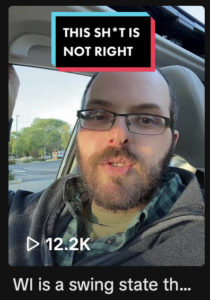
A screenshot of a tiktok I did talking about wisconsin's undemocratic maps

You can see it here.

It blew up.

I mean, it didn’t go viral by some standards. But I had double-digit followers on the platform and had barely ever posted any content. And this post reached around 11k views within a few days (now north of 12k fwiw).

And it didn’t just get a lot of views. It also got a ton of engagement. At the time I’m writing this, it has over 1200 likes and nearly 100 comments.

Which, in and of itself, was mind-blowing. But what really knocked me out was how many of the folks commenting were right here in Wisconsin.

At that time, I kind of assumed that TikTok’s algorithm wasn’t breaking things down like that. It seemed more general — dances and trends were going viral nationally (or even globally!)… not locally.

This video helped me see —quite clearly — that TikTok can, without a doubt, do local.

A few days later, I was livetweeting a debate between Mandela Barnes and Ron “mouthwash cures COVID” Johnson. I tweeted that it was pretty clear that while Mandela Barnes was from Wisconsin, Ron Johnson was from the 1950s.

It did pretty well on Twitter. So I repeated the line on TikTok.

And guess what? It really blew up!
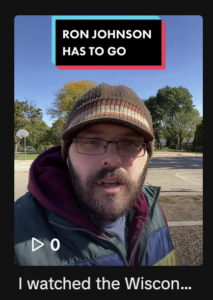
Screenshot of a Tiktok about Mandela Barnes and Wisconsin Senator Ron Johnson

The video was 9 seconds long and it reached over 42k people! It has (at the time of this writing) over 6600 likes and 200 comments.

You can see it here.

And it was, again, engaging actual Wisconsin voters.

With that, I was hooked. I’ve been sharing about a video a day on average ever since.

Initially, this was all an organizing effort to try to get out the vote for Mandela Barnes, Governor Tony Evers and Wisconsin Democrats up and down the ballot during the November 2022 Midterm elections.

Mandela got closer to unseating any incumbent Senator nationwide, Tony won re-election and Wisconsin Assembly Democrats held off a supermajority (something that was far from guaranteed – it was actually the subject of that first video, if you want to check it out).

After November, I pivoted to Wisconsin’s April election, with the goal of helping flip the Wisconsin State Supreme Court (which we did!).

Then, it was just on to general organizing and progressive educational content.

Throughout I’ve focused on Wisconsin, but never limited myself to it. I’d say about 60% of my posts are Wisconsin-specific, while the rest are national stories.

Since that first video talking about Wisconsin gerrymandering, I’ve wracked up nearly 5 million views.

And hundreds of thousands of likes.

And tens of thousands of comments.

And also – very interestingly – countless shares (both to other users as well as to other platforms).

So here’s what I’ve learned since I started posting daily to TikTok a year ago


Niche Matters

This isn’t novel advice, but it holds up: having a niche matters. If your content is all over the place, the algorithm just isn’t gonna know what to do with you.

I actually have three TikTok accounts (sigh). I don’t post to either of the other two with the same kind of frequency that I post to my primary account, but I’m a guy with a lot of interests. Rather than cramming them all into one account, I spun them out into three.

My second account is for my music. I’m an Americana/folk/bluegrass singer/songwriter – it’s called Flannel and Rust – you can find that account here.

My third is in the digital marketing space. It’s called Free Digital Tools and I share digital marketing tips, tricks, hacks and strategies – you can find that account here.

Engagement Matters… If You Want To Build A Community

Some days it’s practically a full-time job, but I respond or engage with every single comment. The only exception to this is on posts that really blow up, I sometimes just have to give up.

I had one post reach over 500k people. I tried to keep up with the comments, but they were coming in faster than I could respond.

I try to give meaningful responses to real questions and comments. If it’s a simple comment (“boost” or “thank you”), I often respond just with simple statements such as hell yeah, or yes! I also regularly use emojis to respond.

But those responses matter. For the algorithm for sure, but also for the community building component.

TikTok isn’t really a social platform. It’s a video platform with a wonky comments section.

But I’ve had numerous folks reach out (in comments and in my DMs) to let me know they appreciate that I’m responding and engaging with them.

And the more I make these videos and engage with my community, the more folks are starting to tag me into other people’s videos. I’ve also started having requests from folks to do videos on certain topics!

It’s a big world out there — but over the last year, I have managed to build up not viewers, but a community. And that’s not something to ignore!

My content is very partisan. Most folks commenting love that. Some hate it. If someone has a ridiculous comment, I might not respond. But often I do. And unless they’re a serious jerk, I always try to engage with them in a respectful and decent way.

It’s easy to call someone a jerk and move on. I don’t do that. I engage.

I have had people in my comments tell me they are Republicans, but that if I ran for office, they’d vote for me. (Needless to say, I’m as opposite of a Republican as they come!)

I’ve had people say nasty things in my comments, and I’ve responded with decency and seen them get taken aback. One person literally thanked me for not being a jerk back to him, and let me know that while he doesn’t agree with me, he understands that we can all do better.

Not sure what better outcome I could ask for from someone who supports Donald Trump for President. While I want Democrats to win at the ballot box, getting everyone to be a bit more decent sure seems like a small victory to me!

Sound and Lighting Matter (As Well As Content Of Course) — But Not Much Else!

In the title of this post, I said I had almost 5 million views without ever dancing, following trends or using editing software.

That’s not quite true. I did one video using editing software — it was an excerpt from my podcast. I thought the video was great. It bombed.

I’ll likely try again — but honestly, this is not a problem. It’s a gift!

If every video had to be highly produced to succeed, there’s no way in hell I could drop a video a day (often more!).

It would take a week to pull something together.

Lighting matters. Sound matters. Content matters.

But in my experience, that’s about it.

I often use the greenscreen tool to show screenshots behind me in a shot. But more often, I literally just flip my camera around and hold it up in front of my computer to show a website or a tweet, while I talk over it.

The first time I did that, I was almost too embarrassed to hit post.

But it did great and now I do it all the time.

In my experience, folks don’t care how “good” the content looks, they care about how helpful or interesting it is.

That is a gift for you and your brand. There is nothing standing between you and posting “good content” save for the will to get started.

You don’t need to be an Adobe Premiere expert or to know how to create amazing digital graphics — you just need to pull out your phone and start talking.

Hooks Matter

I’m a storyteller. It’s literally my job title (Digital Storyteller/Strategist). I love to spin out a tale, working patiently toward the lesson, the punchline or the takeaway.

But not on TikTok!

On TikTok, I start with the hook and then I build back to it.

You have moments to get folks to stop scrolling and hang with you for the length of your video. You either nail them with your intro… or you can wave goodbye.

A good intro needs to do two things: it needs to be captivating enough to get them to stop scrolling, and it needs to connect directly to your video.

You can shout “sex” or something stupid, to get their attention. And you will probably get it — but if it doesn’t connect, the audience is going to know and they are not going to treat you kindly.

Follow those two simple rules above, and remember that your intro is your hook. Then find a way to build back to it.

You Never Know What Will Work… So Just Keep On Posting

I’ve done posts that have reached a few hundred people. And posts that have reached hundreds of thousands of people.

What was the difference in them? No freaking idea!

Honestly, my posts that “blow” up are rarely the ones I think will.

I drop a post and watch it hit a few hundred. Sometimes it stops there. Sometimes, it gets up to 1500. Sometimes it keeps climbing into the tens of thousands. And occasionally it just keeps going, reaching hundreds of thousands of people.

I have no idea why one post flies while another one doesn’t. I could stress out about it — but instead, I just keep going.

By posting around once a day, I am confident that some posts will do fine, and others will do great.

Don’t stress about how well today’s posts are doing — just keep on going.

TikTok Analytics Are Just Okay

TikTok analytics are pretty powerful. BUT you can’t look back beyond 60 days.

There are some holes in their analytics in general — but they’re better than Twitter’s (never-working these days) analytics. And much better than LinkedIn’s analytics. I’d say they’re about on par with Instagram.
Except after 60 days… poof. They are gone completely.

So if you care about such things, either hook your account up to a third-party tool that will keep tracking and reporting on that data for you, or export it yourself on a regular basis.

I do both. I have my TikTok account hooked up to my Publer account solely for analytic tracking. But I waited too long to get started there and it’s not a full picture. So along with that, once a month, I export data for the previous month and add it to a spreadsheet where I can see reach, comments, likes and shares.

I do this because I’m a huge analytics nerd. But I’m a huge analytics nerd because I think if you aren’t tracking your analytics, you don’t really have any idea what’s working.

Do with that what you will 🤓

Keywords Matter

Like I said above, I have no idea why one post works well and the next doesn’t. But I do know, that for the content I want to be shown to folks in Wisconsin, I use every tool in my digital toolkit to ensure that happens.

When my videos are intended for a local audience I use the word Wisconsin in the video, as well as in the accompanying text. I also use a few Wisconsin-specific hashtags. And I tag myself as being in Wisconsin.

I do all of the above about other locations as well (say I’m doing a story about Ohio), save for tagging myself there. It’s possible TikTok won’t mind — but I feel weird essentially lying to my community.

The text accompanying TikTok posts used to be limited to 150 characters (shorter than a tweet!). Then they bumped them up to 2200. You do not need to use them all, but it’s nice to have the option to go a bit longer to really get those keywords in there.

Take advantage of it.

When I’m doing a story about a local area (city/municipality/State Assembly district…), I’ll use hashtags for all the largest communities in the area.

If I was a local nonprofit or business, I’d be tagging myself in my city, as opposed to my state. But for me, I’m talking to a statewide (if not a national) audiences more than to local ones.

Do what makes sense for you.

I’ve already spoken about this above, but it’s so important, I’d be remiss not to reiterate: TikTok can get local! You just have to help it get there.

There Are No Links, But You Can Definitely Still Move and Mobilize People

You can add a link to your bio IF you have at least 1000 followers OR you register as a business.

I registered as a business right off the bat in order to add that link, but they kept taking down my videos. Once I switched off the business setting, my videos got taken down waaaay less often. They clearly hold business accounts to different standards than individual accounts. It was infuriating, because none of my videos were against TikTok’s terms of service, but it is what it is. I switched it off and the problem mostly went away.

That link in your bio is the only link you get on the platform.

And despite having tens of thousands of people visit my profile, I get virtually no traffic to my website from that link.

But TikTok can mobilize people without a doubt.

Early on, I ran a test. Ron Johnson was being ridiculous (what else is new!). He had set up a website asking for public input on something absurd. I did a video encouraging folks to go ahead and let him know what was on their minds. 😏

I built a Bitly link and mentioned it in my video. (If you aren’t familiar with Bitly links, check out episode 20 of my podcast Step Up Your Social — I discuss what they are and when to use them.)

Why did I use a Bitly link? Two reasons:

1) Expecting people to retype the full website would have been ridiculous (remember, you can’t click the link, or even copy and paste it, so folks have to type it out).
2) Bitly links come with built-in analytics.

I knew folks would like and comment on my post. I wanted to see if they would also take action.

Guess what: they did!

This was VERY early into my year of TikTok and dozens of people followed the Bitly link to go talk directly to Ron “never saw a conspiracy theory I wasn’t willing to promote” Johnson.

More recently, I’ve been very active in the fight against the Wisconsin Republican’s bullshit, undemocratic, what-the-hell-are-they-even-thinking impeachment of Justice Janet Protasiewicz. Wisconsin Democrats built out a website called defendjustice.com and have asked folks to go there, get contact info for their elected officials and reach out against impeachment.

I did a few videos and scores of people reported in the comments that they had done just that.

One of the videos alone was also shared 550 times!

And it’s not just digital engagement.

I’ve posted about special elections and had people report in the comments that they didn’t know there was an election but that it was their district and they were going to vote because I had alerted them to it.

I’ve never had a tweet directly lead someone to go vote (not that I know about anyway). But I’ve had dozens of people TELL ME they voted directly because of my content. Who knows how many more people were indirectly affected by it? The shares on some of my videos are wild!

TikTok doesn’t let you send traffic like Facebook or Twitter — but it can sure as hell mobilize people if used well.

There’s a Massive Opportunity In Going Live

I haven’t used TikTok Live much, but there is a massive opportunity should you choose to build out a live strategy.

(Quick caveat: you need 1000 followers in order to go live. So if you can’t figure out how to go live, that’s probably why. Keep posting — you’ll get there!)

I generally do short news roundup-type posts. They don’t lend themselves easily to live content.

At some point, I hope to partner up with other creators and do live conversations — but while it’s just me, it’s been hard to find an easy way to make live make sense.
That said, I went live once this past year and I was legit blown away by the experience.

Remember when the House of Representatives REALLY didn’t want Kevin McCarthy to be Speaker of the House, and they just kept voting and voting on who should be in charge?

I went live for a round of voting — it actually wound up being the final round (!!!) but I had no way to know it would be at the time.

It was late. I was watching C-SPAN by myself on the couch (because — hello, I’m a huge nerd if that’s not already clear!). I wanted to watch one more round before bed, my wife was already upstairs sleeping and I was just messing around. I pulled out my phone, hit live and just held my phone up to the TV and started talking.

Within minutes, I had 1500 people watching me talk. It was jarring.

But very quickly, the vast majority of them bounced. And I was left with about 25 people. Folks came and went, but a core group stuck with me the whole time. And I was live for over an hour!

Like I said above, this isn’t about an audience, it’s about a community. I’d much rather have 25 people hang with me for an hour than 1000 people tune in for 30 seconds.

It was an interesting conversation — they could only type in the comments, I could type or speak. Mostly I narrated what was happening and answered their questions.

The folks that stuck with me, LOVED IT. Like, way more than my wife or IRL friends would have 🤣

There were a few Republicans in the chat who were asking me questions and pushing back. But it was cordial and interesting. One young guy in Washington State told me his gummies (plural!) had kicked in and that he had a crush on me. It was unlike anything else I’ve ever done on social to date.

I never even once showed my face. My camera stayed on C-SPAN the whole time and I just spoke to the folks who were watching with me.

If this was my primary business platform, I’d be going live at least once or twice a week.

I’m not saying you have to — but if you can find a way to make it work for you, and you have at least 1000 followers, I highly recommend giving it a shot. Worst case scenario — it doesn’t go great. Best case scenario — your audience falls for you… hard. ❤️

TikTok Customer Service Sucks… Just Like Every Other Major Social Media Platform

While I was writing this blog post, I took a break to check my notifications and I saw something weird. “Josh Klemons” was responding to dozens of comments with videos trying to get people to follow him to Telegram.

This was obviously not me.

Someone had taken my name, photo and handle (with an added _ ) and was trying to get people to follow him to Telegram in order to sell them crypto (I know because I followed him and got his garbage pitch).

On the one hand — it’s flattering. Weird to think I have enough engagement or clout for someone to bother going through the trouble. I guess. 🙃

But of course, I was horrified. Someone was trying to use my name and photo to run a scam.

I immediately reported the account to TikTok.

Impersonating someone like that is against their terms of service. It’s spelled out clearly.

But they found no violation. They let me know that if I want, I can take up the issue with law enforcement. There is no appeal process.

I went to their customer service Twitter account and asked for help. I got an auto-response telling me to report it on TikTok. I immediately responded that I’d done so and it hadn’t helped. No response despite many messages trying to re-engage them.

I did a video letting folks know what was happening. Sure enough, he was DMing a bunch of my followers trying to scam them. A bunch of them reported the account. Still nothing!

It makes no sense to let this kind of corrupt BS continue — but that is exactly what TikTok is opting to do.

A few weeks ago, I posted a story about Nazis marching in Wisconsin. I was obviously horrified at the fact. TikTok let the video run for a bit and then took it down as being against ToS. I actually think that’s a good thing — they should be overly cautious about Nazi-related content.

But I appealed, hoping they would see that my content was anti-Nazi, not pro.

Didn’t matter. Not only did the video stay banned, they warned me that I had received a strike on my account and that further strikes could cost me access to parts of the platform.

How many more strikes? What might I lose access to? How could I prevent such strikes?

None of those questions have answers anywhere to be found.

It’s quite disappointing that a platform as important as TikTok has opted for such a hands-off moderation approach.

Need help from TikTok customer support? You might as well reach out to Meta to ask for it — you’re equally unlikely to find it there or anywhere else.

I say this not to dissuade, but to ensure you know what you are getting into as a content creator on TikTok.

To Post Or Not To Post

I’m not saying you should be posting on TikTok. I am saying that there is a tremendous opportunity to grow a community on the platform.

If you have ever thought to yourself, I can’t post on TikTok because I don’t want to do silly dances and keep up with trends — let this post serve as an inspiration to the fact that, while those work (well!) for some, I’ve had nearly 5 million impressions and over a third of a million likes in less than a year without ever once dancing or using trends.

Truth be told, I did try one trend one time. It bombed. I deleted it and never looked back.

There are people doing amazing things on TikTok with complicated editing, brilliant comedy, amazing… everything! And I’m so glad those folks exist.

But there is room to grow on TikTok to just pull out your phone and talk — in a helpful way — to your audience.

Don’t believe me?

Come join my community on TikTok and see for yourself.

In the words of one great community member:

screenshot of a tiktok comment that reads: "Thanks for the local news. Your account is so awesome."

I didn’t set out to serve as a source of local news. But once I realized I was helping people keep up with topics I cared about, I felt lucky to get to keep it going!

Want to talk TikTok, or digital marketing of any kind?

When I’m not posting to TikTok, I’m helping progressive brands, campaigns and organizations find, hone and tell their stories online.
Hit me up today and let’s win the internet together!

September 21, 2023/0 Comments/by Josh Klemons
https://joshklemons.com/wp-content/uploads/2023/09/what-ive-learned-from-a-year-on-tiktok.png 1500 1500 Josh Klemons https://joshklemons.com/wp-content/uploads/2023/05/Reverbal-Communications-Josh-Klemons.svg Josh Klemons2023-09-21 12:05:402024-12-05 10:54:38I’ve gotten nearly 5 million views on TikTok in a year and I’ve done it without following trends, dancing or using any video editing software. Here’s what I’ve learned.
Email, Hello Merge Tag, Politics

Digital Fundraising For Downballot Candidates With Jacob Malinowski | Hello Merge Tag Ep 1

Raising Money For Downballot Candidates

The inaugural episode of Hello Merge Tag is now live!

We checked in with Jacob Malinowski, a digital fundraiser with Goodman Campaigns, a firm dedicated to helping downballot, pro-choice candidates raise money through email, text and direct to donate ads.

He was recently involved in the Janet For Justice race, as Janet Protasiewicz ran a successful race for Wisconsin State Supreme Court. Jacob and his team helped raise $1.1 million for the campaign.

Dem donors will give to candidates who don’t spam, write substantive communications, and actually say a reason to give.

That’s what the team at @janetforjustice did — and it worked to the tune of $1.1m https://t.co/fPSOrsv7yz

— No Jail Jacob! (@JPMalinowski) April 6, 2023

We checked in with him to find out how they did it, and what they learned along the way.

Jacob shared loads of tips and specific takeaways, including

  • Some “magic words” he uses (or rather avoids)
  • The benefits and dangers of starting with templates
  • How to write downballot emails that feel genuine and authentic
  • The power of top 10 lists in digital fundraising
  • Growing lists from scratch
  • The potential role of AI in digital fundraising programs
  • And so much more

Connect with Jacob on Twitter and and find his firm Goodman Campaigns.

Stream the full episode right here, or wherever you stream podcasts.

Find all episodes at HelloMergeTag.com.

April 14, 2023/0 Comments/by Josh Klemons
https://joshklemons.com/wp-content/uploads/2023/04/Jacob-1.png 1500 1500 Josh Klemons https://joshklemons.com/wp-content/uploads/2023/05/Reverbal-Communications-Josh-Klemons.svg Josh Klemons2023-04-14 13:59:382023-07-12 12:50:40Digital Fundraising For Downballot Candidates With Jacob Malinowski | Hello Merge Tag Ep 1
Email, Politics, Uncategorized

9 Things We Can Learn from the Wisconsin Conservative Digest About How To Run Better Email Programs

When it comes to digital marketing, I’m not one to punch down.

Digital — like life — is hard. People are doing their best. There are going to be typos. And broken links. Formatting is going to occasionally fail you.

It happens.

But some digital programs are so bad, we would be remiss NOT to learn from their mistakes.

And since I never subscribed to this particular email list, yet they were fine acquiring my email address and spamming me with their no-good-very-bad-what-is-even-happening-here email program, I just had to pull together a blog post outlining 9 things we can learn NOT TO DO from the Wisconsin Conservative Digest email program.

First things first — what is the Wisconsin Conservative Digest?

I legit have no idea. Other than getting their emails in my inbox, I am not familiar with their work.

They clearly have an agenda, but their goals — as you will soon see — seem to be a bit all over the place.

So let’s dig in.

1) Don’t Buy Email Lists

The digital world is full of list swaps and emails for sale. It’s a huge problem, both for campaigns and organizations trying to do digital right, as well as for anyone who actually uses email. Which is, you know, all of us!

People are becoming afraid to give their email address, much less financial support, even to orgs and campaigns they support, for fear that their email will quickly get passed around, sold and shared by campaigns near and far.

Wisconsin Conservative Digest bought (or somehow acquired) my email address.

How do I know this?

First of all, I never subscribed. So that’s a pretty big hint!

Second of all, they acquired a version of my email that has a tracking code built right into it.

I wrote a whole blog post about this if you want to dig deep, but the short version is that I subscribed to the email list of a candidate using a version of my email that was unique to his campaign.

That email address promptly got sold, to many other groups and campaigns, including one that was openly supporting one of his opponents. Which is… decidedly… amazing. Want the full story? It’s in that blog post I mentioned which you can find here.

So WCD bought my email address and now they spam me with their oh-so-so-so-bad content. Which is a HUGE part of why I’m willing to punch down here.

Cause most of us are legit just doing our best. But that forgiving attitude goes out the window the moment you start buying and swapping lists and spamming people. In my humble opinion anyway.

Okay, so let’s keep going.

2) Onboard New Signups To Your List

Let’s reiterate that you shouldn’t buy people’s emails. But if you’re going to, the least you can do is properly onboard them!

What does that mean? Write a short series of emails that introduce people to you, your work and why you’re in that sacred inbox you’ve hustled your way into!

And WCD definitely did not do that.

They acquired a list of emails (mine included), added us to their Constant Contact account and just treated us like we were long-time members of their list.

No introduction, no explanation, no expectation setting… just emails about their work and spouting their agenda.

So many campaigns do this as well — they acquire lists of unassuming folks and just start asking them for money.

Which is bad for soooo many reasons. But first things first, don’t start with a money ask! At least let me know who you are, why I should care and what you’re fighting for.

If I like what I hear (and make it through the first few emails without unsubscribing and marking you as spam), THEN you can ask for money.

Never before.

But the thing about an onboarding series is that they aren’t only for emails you bought. They are also great for folks who have intentionally opted to sign up for your list.

Picture this: someone gives you their email. They don’t get a message from you for 10 days. Then they get a generic money ask.

You had someone excited to connect with you and your mission. You treated them like an ATM. Bet your conversion rate isn’t great.

Now picture this alternative: someone gives you their email. Twenty minutes later, they get a note from the campaign manager or executive director welcoming them aboard. The email is short, but outlines what your organization is working on and how important the community is in helping reach your collective goals.

Three days later, they hear from another stakeholder in the org telling them about a recent success.

Four days after that, they get a note letting them know about the work you are doing on social media to bring about change and you invite them to join you.

Five days later they get another email asking for money. They’ve been on your list for less than two weeks. But during those two weeks, you’ve brought them along on a journey. You’ve treated them with respect, showing them you see them as a valued member of your community, not just a potential rube with a credit card.

Now when you make your ask, the recipient understands why their $5 or $10 matters, and how it can help move the needle.

Which of these two approaches is more likely to lead to long-term supporters, engaged in keeping your mission going?

If you’re not sure, then digital marketing might not be the right path for you.

The second path is harder, but digital is about building relationships. And you don’t build relationships with quick churns and cash grabs. You build it by investing in the people who share your passion for the shared mission.

3) Subject Lines Matter

Other than sender, a subject line is the first thing the reader sees. And that SL will likely determine whether or not the email gets opened or sent straight to the trash.

Look at these subject lines:

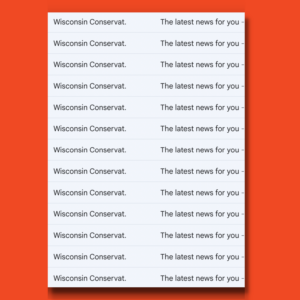
Subject Lines matter

A good subject line captivates and makes you want to learn more.

A bad subject line says something generic like “The latest news for you” and then it repeats itself over and over and over and over.

Write subject lines that make people want to read more.

4) Preview Text Also Matters

After sender and SL, the next (and potentially only) part of an email that a recipient will see is the preview text.

While the idea is that it’s showing you a preview of the text in your email, Mailchimp, Constant Contact and any CRM worth its salt will let you write whatever you want into the preview text.

Which is great. Sometimes your hook isn’t the first line of your email. But it can still be your preview text.

A good preview text gives readers a bit more context behind what’s waiting for them, should they click open.

Here’s an example of some bad preview texts:

Preview text for emails

The subject line told me nothing. The preview text was just as bad.

I’m sure that a whole lot of people just deleted and ultimately unsubscribed from this list.

I took on the terrible job of staying on their list for you! Someone had to review these emails to help us learn what not to do in email marketing.

So… you’re welcome. 🤦‍♂️

5) Spell Check Is Your Friend

I had spell check on my computer before I had AIM, much less Friendster. It is not a new technology.

Use it!

It’s fine to write fast. But then take time to edit.

Remember that your email is going to be read by real people (assuming you can get them to open your email with a decent subject line and preview text).

There are loads of free and paid tools that will do your spell-checking for you.

Grammarly is quite popular! Install it and let it check your work.

Hemingway App is another cool tool you can try out.

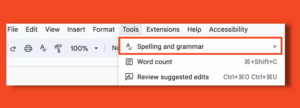
Drafting your emails in a Google Doc? Go to the menu bar and select “Tools.” “Spelling and grammar” is the very first option!

Using spell check in a google doc

Needless to say, Wisconsin Conservative Digest does not take advantage of any of these simple tools.

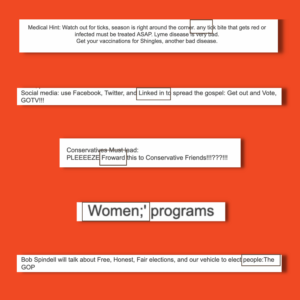
Avoiding typos in an email

This is a random smattering of just a few of the many, many spelling and grammar issues I immediately saw within their emails. There were scores more in the dozens of emails they sent me.

Typos happen — even with spell check and Grammarly and professional editors. But at least try to catch them!

This email program clearly isn’t concerned about typos. You should be.

6) Formatting Is Also Your Friend

The majority of people will read your email on their phone. Write it with that in mind.

Formatting matters so much.

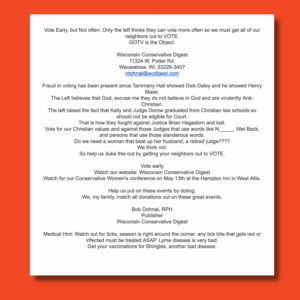
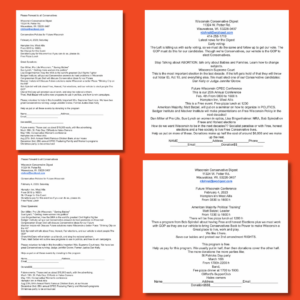
Look at this email.

The importance of formatting in an email.

It doesn’t really matter how good (or in this case BAD) the content is, I’m not going to read it!

Why is it all centered? That makes it so much harder to read.

They used short paragraphs, which is actually great. But they should have added an extra line of space between each one (you know, like I’m doing here). That would make it so much easier to read.

Why is their name and address plopped right at the top without context or explanation?

They tell you to “watch our website” but then type out their organizational name without hyperlinking it to their website. Am I supposed to do a Google search to continue connecting with them?

The fascinating thing with their email program is that I’ve received dozens of emails and they do seem to be testing different formatting approaches. Three or four in a row will have a certain look. Then they’ll switch it up and try something else.

But all of them are hard to read and even harder to follow.

Yes the content is bad. Yes the spelling and grammar are bad. But also, the formatting shows they clearly gave no actual thought to the person on the receiving end of this screed.

Think less about the medium and more about the reader. What would help you read your own email? Is it easy to skim for someone who doesn’t have time to read every word?

Use bold and italics to clarify what’s important. Don’t be afraid of headings and bullet points. Images can really keep things moving along.

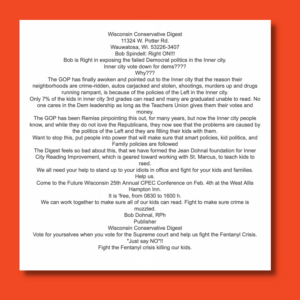
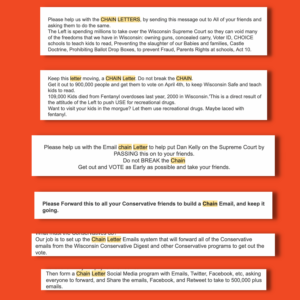
Or… you can just send something like this and guarantee no one reads a single dang word of it.

When it comes to emails, formatting matters.

7) Keep Your Calls To Action Clear

Generally speaking, an email should have one call to action.

The general rule of thumb is that you if you want a second CTA, it goes in the PS.

Al Franken popularized this concept. In his emails, back when he was in the Senate (as opposed to now, guest hosting The Daily Show), he’d regularly pull back the curtain and make a joke about how he gets to ask for something extra in the PS.

If this concept of a single CTA surprises you, go back and read an email from AOC or Katie Porter or Joe Biden or the Sierra Club or… you get the idea.

The biggest and best run email programs follow this rule.

Why? Because asking readers to do more than one thing is the equivalent of asking them to do nothing at all.

Folks aren’t going to do eight things after reading your email. Heck, you’ll be LUCKY if you can get them to do one. So pick your priority and then build your email around it.

Now in fairness to WCD, they are a “news” organization, as opposed to a nonprofit or a political campaign. (I use the words “news” here very lightly.)

But a lot of their emails aren’t trying to share breaking news or do round-ups of top stories. Rather they are trying to get folks to take action.

And yet, their emails are regularly stuffed full of CTAs.

Vote early. Tell your friends. And donate. Also, join us at some upcoming events. But also watch out for ticks. And get your vaccination for Shingles. (Yes, those last two are actually discussed in numerous emails that are otherwise fully political.)

They’ve also got this weird thing they do where they are pushing their emails as “CHAIN LETTERS” and asking everyone to forward them on to their friends. You know, like we all do on the internet in 2023.

Write your emails for your audience.

The next time you write an email for your organization, pick one ask and build the whole email around it. You’ll be amazed how much easier it is to write something clear and compelling when you’re not asking folks to do 15 things, but just focusing on a single actionable goal.

8) Preview Your Draft Before Sending

You wrote a draft. You edited it. You had your co-workers review it. You’ve run it through spellcheckers. Everything is perfect.

You load it up into your email program and you hit send.

Then you receive your email in your inbox, open it and immediately notice that your logo was chopped in half. Or there is a weird spacing between your paragraphs. Or the text is so small, you can’t read it without a magnifying glass.

There are a million things that can go wrong, even if your draft was perfect. 
Which is why you should always preview your email before sending it out to your list.

When you do so, you see it the same way everyone else on your list will.

Read through it with fresh eyes. Click links and make sure they work. Quadruple-check that everything looks good and is easy to read.

WCD doesn’t preview their emails. How do I know?

There are sooooo many ways.

For one, if they previewed their emails before sending, they would catch a lot of the problems we’ve laid out above.

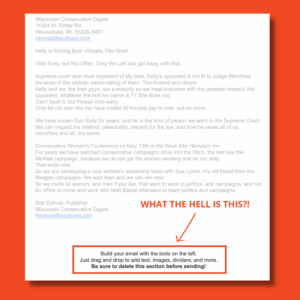
But here’s something I noticed in one of their emails recently.

Why you should always preview your emails

What the hell is that? That’s instructions on how to use an element from Constant Contact who specifically instructed the sender to “delete this section before sending!” They even put it in bold and used an exclamation point.

Is that easy to miss while setting up your email? It sure is.

But it’s pretty near impossible to miss if you actually read the dang thing before hitting send!

Here’s another one I love.

Email formatting

Okay, for this one I had to zoom out A LOT to give you a sense of what was in my inbox. This is about 1/3 of the email. The following 2/3 are… more of the same.

Which is ridiculous. It should have had one of those little boxes and then listed the dates with links and info. Showing the same image over and over and over and over… there’s no better word for it than ridiculous.

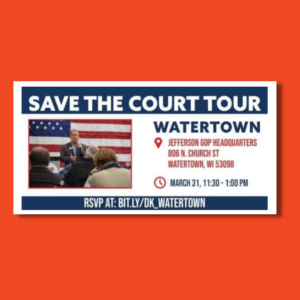
But now let’s zoom in on one of those boxes.

Formatting an email

Okay, as a standalone graphic, it’s fine. And they used a customized Bitly link to simplify the URL. Which is actually great! A lot of folks don’t do that and it’s a huge missed opportunity when using link shorteners. (I actually cover this topic in a recent episode of my podcast Step Up Your Social.)

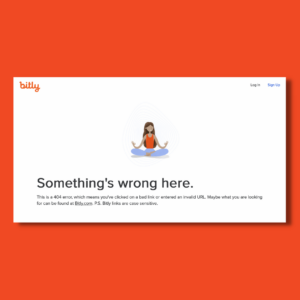
But here’s something important you should know: Bitly links are case-sensitive.

Which is bizarre, but it’s also a fact.

So if you go to bit.ly/dk_watertown, you get to a sign-up form for the event.

BUT if you go to BIT.LY/DK_WATERTOWN (which is how they wrote it in the email), well…

are bitly urls case sensitive?

Now I am a certified digital nerd. Do I blame you for not knowing that Bitly links are case-sensitive? Not at all!

BUT if WCD had looked at a preview of their email, and checked their links, they would have quickly caught their mistake.

Don’t be like the Wisconsin Conservative Digest. Preview your emails!

This brings us to our final takeaway from this brutal email program:

9) Write For Mobile… Or At Least For The Internet!

We’ve already looked at a lot of ways that WCD isn’t writing content that’s optimized for mobile devices.

But often, their content isn’t even optimized for the internet!

Write your internet content, including emails, for the internet.

They’re asking for money. And then putting in a bunch of lines for me to… well I’m not really sure!

I guess they expect me to print these emails out, fill them in and mail them in with a check?!?

It’s fine to offer the option to send money by check. But they don’t even offer an option to donate online!

It’s 2023 — get a PayPal account!

I could pull more examples, but I think you get the idea.

To recap, here are 9 things we can learn about writing better emails:

1) Don’t Buy Email Lists
2) Onboard New Signups To Your List
3) Subject Lines Matter
4) Preview Text Also Matters
5) Spell Check Is Your Friend
6) Formatting Is Also Your Friend
7) Keep Your Calls To Action Clear
8) Preview Your Draft Before Sending
9) Write For Mobile… Or At Least For The Internet!

I did the hard work of staying on this list, and actually opening their content, so you wouldn’t have to!

I hope this was helpful.

Anything to add? Let me know in the comments or hit me up on Twitter.

Need help making sure your email program doesn’t look, sound or feel like this? My team and I are here to help!

We’ve run and consulted on email programs for local and statewide political campaigns, nonprofits and companies, big and small, and everything in between.

Be in touch today and let’s step up your digital program!


I put together an Email Success Checklist, to help make sure your email is ready to go before you hit send. Download it free today.

March 31, 2023/0 Comments/by Josh Klemons
https://joshklemons.com/wp-content/uploads/2023/03/bitly.png 1080 1080 Josh Klemons https://joshklemons.com/wp-content/uploads/2023/05/Reverbal-Communications-Josh-Klemons.svg Josh Klemons2023-03-31 09:36:462024-01-11 12:09:029 Things We Can Learn from the Wisconsin Conservative Digest About How To Run Better Email Programs

Categories

  • Brand Management
  • Digital Ads
  • Digital Marketing
  • Digital Tools
  • Email
  • Facebook
  • Gmail
  • Hello Merge Tag
  • Instagram
  • iPhone Functionality
  • Politics
  • Republican Email Tracking
  • SEO
  • Social Media
  • Step Up Your Social
  • TikTok
  • Twitter
  • Uncategorized
  • Wisconsin

Recent Posts

  • Turning Followers Into Voters with Erika Harrison of Black Girls Who Brunch and Claire Shorall of Sway | Hello Merge Tag Ep. 55
  • Stop Thinking About Persuasion. Start With The Bedrock Approach.
  • Are Democrats Ready for Our First Truly AI Election? with Jack Welty | Hello Merge Tag Ep. 53
  • Democrats Don’t Have a Tactics Problem. We Have a Strategy Problem. With Murshed Zaheed | Hello Merge Tag Ep. 52
  • 10 Reasons Publer is My Go-To Tool for Social Media Management in 2026

We’ve got loads of content to help you step up your digital marketing

Check It Out

Ready to take your digital marketing to the next level? We have free checklists for you

Download Them Today

Get social media tips, tricks, hacks and strategies delivered directly to your inbox

Sign Up Today
Contact

info@reverbalcommunications.com

Privacy Policy

Social Media, Digital Marketing, Digital Strategy, Training, Consulting, ​Facebook Ads, Political Campaign Consultant, Keynote Speaker
Based in Madison, Wisconsin. Serving the world.

Get In Touch
  • info@reverbalcommunications.com

Based in Madison, Wisconsin. Serving the world.

Quick Links

  • Why Us
  • Politics
  • Speaking
  • Consulting
  • About
  • Blog +

Get social media tips, tricks, hacks and strategies delivered directly to your inbox

Sign Up Today

© 2025 Reverbal Communications. All rights reserved.

Privacy Policy

Tiktok
Substack update
Threads new update

© 2022 All rights reserved. | WordPress Web Design by Bizzy Bizzy
    Scroll to top

    This site uses cookies. By continuing to browse the site, you are agreeing to our use of cookies.

    OKLearn more×

    Cookie and Privacy Settings


    How we use cookies

    We may request cookies to be set on your device. We use cookies to let us know when you visit our websites, how you interact with us, to enrich your user experience, and to customize your relationship with our website.

    Click on the different category headings to find out more. You can also change some of your preferences. Note that blocking some types of cookies may impact your experience on our websites and the services we are able to offer.

    Essential Website Cookies

    These cookies are strictly necessary to provide you with services available through our website and to use some of its features.

    Because these cookies are strictly necessary to deliver the website, refusing them will have impact how our site functions. You always can block or delete cookies by changing your browser settings and force blocking all cookies on this website. But this will always prompt you to accept/refuse cookies when revisiting our site.

    We fully respect if you want to refuse cookies but to avoid asking you again and again kindly allow us to store a cookie for that. You are free to opt out any time or opt in for other cookies to get a better experience. If you refuse cookies we will remove all set cookies in our domain.

    We provide you with a list of stored cookies on your computer in our domain so you can check what we stored. Due to security reasons we are not able to show or modify cookies from other domains. You can check these in your browser security settings.

    Google Analytics Cookies

    These cookies collect information that is used either in aggregate form to help us understand how our website is being used or how effective our marketing campaigns are, or to help us customize our website and application for you in order to enhance your experience.

    If you do not want that we track your visit to our site you can disable tracking in your browser here:

    Other external services

    We also use different external services like Google Webfonts, Google Maps, and external Video providers. Since these providers may collect personal data like your IP address we allow you to block them here. Please be aware that this might heavily reduce the functionality and appearance of our site. Changes will take effect once you reload the page.

    Google Webfont Settings:

    Google Map Settings:

    Google reCaptcha Settings:

    Vimeo and Youtube video embeds:

    Other cookies

    The following cookies are also needed - You can choose if you want to allow them:

    Privacy Policy

    You can read about our cookies and privacy settings in detail on our Privacy Policy Page.

    Terms and Conditions
    Accept settingsHide notification only